Posts

Mobile Phone Battery Not Charging- What To Do?

Image
Dealing with a dead phone is quite annoying and frustrating, especially at times of need. Getting a constant red alert of insufficient power can be a result of loose plug connection or a faulty charging port. When this happens, you don’t need to break a sweat as this issue can be easily fixed by following a few handy fixes. Fix 1: Reboot Your Device Most of the time, Smartphone refuses to charge due to lose plug connection. To resolve this temporary glitch, you should first try to reboot your device. Rebooting your phone can stop the background running apps and revive your phone’s internal components. If you see your phone performing optimally after a reboot, you should review the third party apps and uninstall unwanted applications to boost your device’s working efficiency. Fix 2: Switch to Different Power Sockets/Adapters Your phone may also refuse to charge due to faulty accessories. Either the power cable may have a loose wire, your adaptor may malfunction, or the soc...

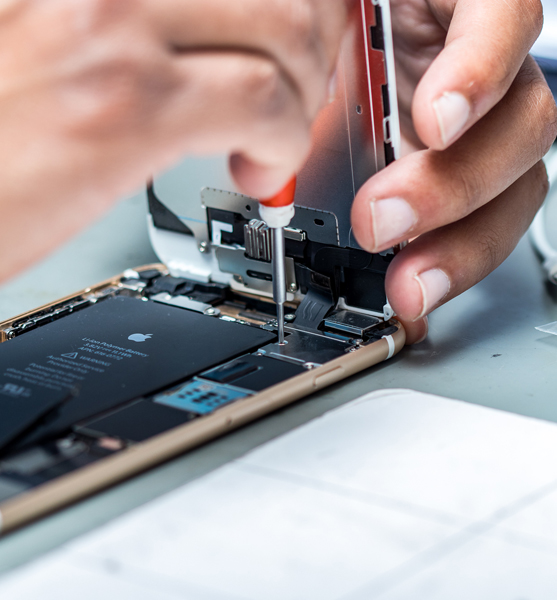
6 Easy Ways You Can Replace the Broken Screen on Your iPhone 5 C

Image
Sometimes, it becomes difficult to contain further breakage of a phone screen that has cracked already. Did your iPhone 5C slip out of your grip? If this has caused breakage of your phone screen and you really cannot hold back your tears in agony, relax. Of course you can do it all by yourself and if you are not confident head straight to a mobile repair shop. They will fix your problem. However, if you prefer a DIY approach you can go through the following tips: Switch off your iPhone handset:   Switch off the power supply of your iPhone. This is the basic step to remember. Now proceed to your next step. Remove security screws:   There are a couple of security screws, sitting on both the sides of a dock connector. Take them off. These screws secure your phone’s screen to its frame. Work on the display assembly:   Yes! Take it off too. Position a suction pipe right above your phone’s home button. Take the iPhone with one hand tightly and pull the suc...

Mistakes That Increase The Need For Frequent Android Phone Repairs

Image
Mobile phones these days are pretty sensitive. Yes - they are high-tech, and when they are manhandled or used wrongfully, they tend to develop snags. The bottom line is that, as and when that occurs, it raises the frequency of issues prompting you to get your gadget to the phone repair centre in and around Nottingham or in any other place. Here are some of the practices that you need to get rid of, at the earliest if you are to lengthen the life of your phone. If You Are Using a Wireless Device For Charging... Some technologists are of the opinion that says, charging android phones with the help of the wireless charging devices drastically diminishes the battery life of a phone. In fact, these wireless chargers push the phones through some needless recharging cycles, which do no good to the battery life. If you are not using a case for your phone.... A survey recently conducted performed by consumer research that revealed a startling fact. The study has revealed that...

Ways to Straighten No Haptic Feedback for 3d Touch on iPhone 7

Image
At times, you will find that you are getting no haptic feedback for the 3D touches on your iPhone 7. There might well be a number of reasons behind that. At times, it may be caused by stings or at times by any firmware issue. Now, when it comes to fixing this glitch, there are various methods that the pros try. The problem can be fixed by using three different ways: By enabling the system haptic Changing the 3D touch sensitivity Resetting every setting right from the scratch Way 1: By Enabling The System Haptic The first and foremost way that can be used is an elementary one. All it involves is enabling the System Haptic feature. The user will be able to enable as well as disable the haptic feature on their iPhone 7. Therefore, the problem of no haptic feedback can surface up, when this feature is disabled in a device. The feature can be enabled by: Opening the Settings Tapping on sounds & Haptic Swiping down to find, ‘system haptic’ Toggling it off and on...

How to Get Your Phone Unlocked- A Brief Discourse

Image
Having an unlocked phone let you use any SIM. So, when it comes to checking if your phone can accept SIM cards from different networks, you should try to know whether it is locked to a particular network or not. In the UK, there are some major network providers including O2, EE, Vodafone, Three and Tesco mobile. Well, here are several reasons why you might want to unlock the phone and tablet. Cheaper call rate: When you go to the abroad, you might want to use a different SIM card to switch to the local networks. It ensures a cheaper call rate with local tariffs. Increase the sellability: If you have purchased a phone online and don’t know whether it is locked to a particular network, then you may want to unlock it, in order to sell it. What Happens When a Phone Locked to a Particular Network? In case of a locked tablet or phone, you will only be able to use a SIM card for a certain mobile network to which it is locked. This could be very frustrating if you need to use...

Fallout of Moisture or Water Damage - Signs That Your Mobile Needs Repair

Image
Have you accidentally dropped your mobile in water, or is it that somehow a fair amount of moisture has sneaked through its screen? Well, if that is the case, then you have your task cut out. If only it’s the issue of sneaked-in moisture, you can make amends by using 99% isopropyl alcohol. This is a little trick that comes in handy in fixing a wide gamut of issues that surface because of water or moisture damage. However, let us not skip steps. Let us at first discuss the issues. Let us make a point clear. Do not be too adventurous if you are not a professional mobile fixer. In an effort to make amends, you may inadvertently cause irreparable damage to your phone. So the wisest thing is to get your damaged device to a mobile repair centre near Nottingham. The professionals out there will do things that will fix the issue once and for all.  Well, let us get back to the where we started from and discuss the fallout of water or moisture damage in mobile phones....

“Fix Your Cracked Phone Screen ASAP...!” Here’s Why?

Image
The thing about a cracked screen smartphones is that with time, it only gets worse! It obstructs the screen content, exposes the device, and in time makes it very risky to use! So, if you have accidentally dropped your smartphone, then you should look to get it fixed instantly rather than ride it out with it. “ It Hampers The Capacitive Touch Functionality. ” Shattering or crippling of your phone screen ( if left unattended ) will eventually hamper the capacitive touch functionality of the device. In simple terms; your device will no longer respond to your touch gestures. And if you thought that was bad, oil from fingers or external dust and debris can also make their way inside the cracks and further damage the screen. For this reason only; you should get in touch with notable specialists of phone screen repairs in Nottingham to replace it immediately! “ You Can No Longer Keep Liquids/Moisture From Getting Inside The Phone. ” Cracking your mobile screen can not ...